

Install GoPaperless Agent on Windows
EXE installer guidance based on Quantera documentation; screen labels may differ between releases.
Install GoPaperless Agent on Windows
- Source and installation permissions
- Next → Install → Finish
- Sign in and perform a test
Prepare
- The source lists Windows 8 or later, in 32-bit and 64-bit editions. Check the current release and IT policy; this is not a recommendation to use an unsupported OS.
- Have installation permissions and Internet access.
- Close working applications and check the package source and publisher.
Installation steps
Get the installer
Use the download page to obtain GoPaperlessAgentInstaller.exe from the Mobile-ID repository.
Open the installer
Double-click the file. Accept the User Account Control prompt only after checking the source and publisher.
Continue
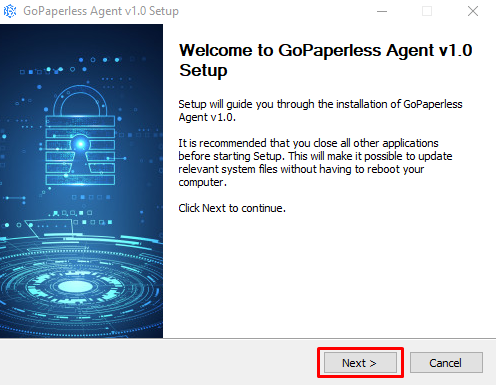
Choose Next > on the Welcome screen.
Review the agreement
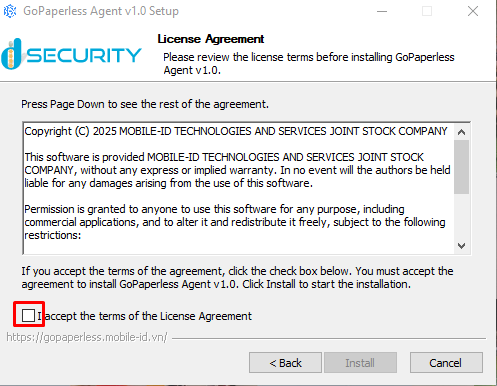
Read the License Agreement and select I accept the terms of the License Agreement if you agree.
Install
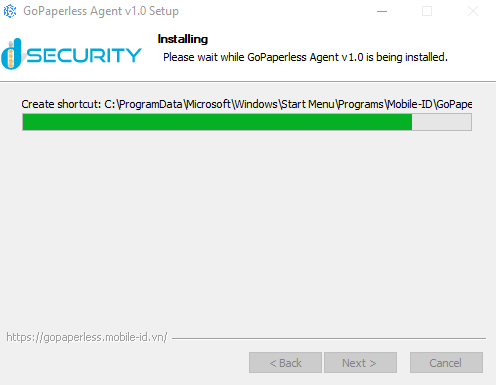
Choose Install and wait; do not close the installer or shut down the computer.
Finish
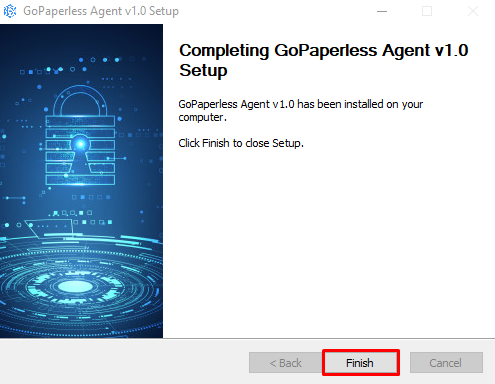
Choose Finish. The source describes Agent launching automatically; check the sign-in screen or System Tray icon.
Source documentation: GoPaperless Agent · Quantera
Screens from the installation documentation
Screens from Quantera documentation show the v1.0 installer interface; they identify steps, not the current package version. Open an image to inspect it in full.
Source documentation: GoPaperless Agent · Quantera
Uninstall
Stop Agent
Close Agent and save any document in progress.
Open the application list
The source uses Start → Control Panel → Programs → Programs and Features.
Remove the application
Select GoPaperless Agent → Uninstall/Change and confirm the application identity.
Complete
Follow Next, Uninstall and Finish in the uninstaller and check the application list.
Source documentation: GoPaperless Agent · Quantera
If installation does not finish
- Check installation permissions, signature warnings and device policy.
- Do not disable operating system protection to bypass an error.
- Send IT the OS version, package name, error and time; never send passwords or PINs.